
In today’s rapidly evolving digital world, managing multiple X (formerly Twitter) accounts can become a highly demanding task. Whether you are a social media marketer, an influencer, or a business owner running multiple accounts for different campaigns, the challenges are real: IP blocking, constant manual logins, the risk of being flagged as spam, and the difficulty of tracking performance for each account. MKT X emerges as a timely solution — a powerful automation software designed to help you manage unlimited X accounts on a single device. In this article, MKT Software will guide you step by step on how to use MKT X effectively, enabling you to manage multiple accounts, automate tasks, and maximize your overall productivity.
1. Introduction to MKT X Software
MKT X is a leading account management and automation software for X (Twitter), developed by MKT Software — a prominent technology company headquartered in Vietnam. The software enables users to manage, maintain, and automate an unlimited number of X accounts on a single device, operating through a powerful built-in browser that simulates real user behavior to avoid spam detection and maximize outreach effectiveness.
With a user-friendly, multilingual interface and continuous free updates, MKT X is an ideal tool for marketers, businesses, and individuals looking to scale their reach and campaigns on the X platform efficiently and safely.
2. Why Choose MKT X for Multi-Account Management?
MKT X stands out as one of the best X account management tools in 2025. The software operates on an integrated browser capable of mimicking real user behavior, allowing you to automate interactions while minimizing the risk of detection by the platform. Its key benefits include:
- Unlimited account management: Easily import, export, and categorize as many accounts as you need without any limitations.
- Powerful automation features: From bulk posting, messaging, and data scraping to interaction warm-up, MKT X saves you hours of manual work.
- Security & proxy support: Supports HTTPS IPv4/IPv6 proxies to prevent IP blocks and ensure safe, simultaneous logins across multiple accounts.
- User-friendly interface: Multi-language support, continuous free updates, and detailed analytics make it suitable for both beginners and professionals.
- AI integration: Can be connected with tools like GPT or Gemini for smart commenting and automated content generation.
By using MKT X, you can effectively overcome common pain points such as checkpoints caused by frequent logins, flags for unusual activity, and the tediousness of managing each account manually.
3. Getting Started with MKT X
Before getting started, download and install MKT X from the official website (mktsoftwareautomation.com). The software provides detailed demo videos and 1-on-1 support via Telegram to help you with the setup process. Once installed, follow the steps below to begin managing your accounts.
- Contact for consultation and installation support: @nguyenphatmkt
- Download software: https://mktsoftwareautomation.com/download-mkt-software/
Step 1: Importing and Organizing Accounts
- Open MKT X and go to the Account Management section.
- Use the import feature to add multiple X accounts into the software in bulk.
- Categorize accounts by campaign (e.g., “Marketing Team A” or “Personal Accounts”) for easier data management and goal-based automation.
- Assign proxies automatically — MKT X checks proxy status and supports rotating proxies to ensure anonymity.
- Bulk update account information: change emails, reset passwords, or unlock accounts when needed. This is especially useful for recovering restricted accounts.
Pro Tip: Always use high-quality proxies to avoid detection. MKT X’s built-in browser automatically manages unique UserAgents and cookies for each account, ensuring smooth and secure logins.
Step 2: Warming Up Accounts
To build trust and simulate organic growth, warm up new or inactive accounts:
- Go to the Interaction function.
- Set up automated interaction scenarios: likes, reposts (retweets), or comments on feeds, followers’ posts, or specific usernames.
- Interact based on keywords or user lists to gradually increase activity without triggering platform warnings.
- Monitor progress using built-in statistics to ensure accounts appear natural.
This step is crucial for long-term account management, helping reduce the risk of bans and improving engagement rates.
Step 3: Automating Content Posting
Posting across multiple accounts becomes effortless with MKT X:
- Access the Content Management section to add unlimited text, images, videos, or reels.
- Use content spinning and icon insertion to diversify posts and bypass spam filters.
- Go to the posting function: select multiple accounts, choose the content, and publish simultaneously using multi-threading.
- Export posting history to Excel for analysis, including post IDs, timestamps, links, and content.
Example: If you are managing 50 accounts for a product launch campaign, you can publish multiple pieces of content to all accounts at once, with randomized captions to keep everything fresh.
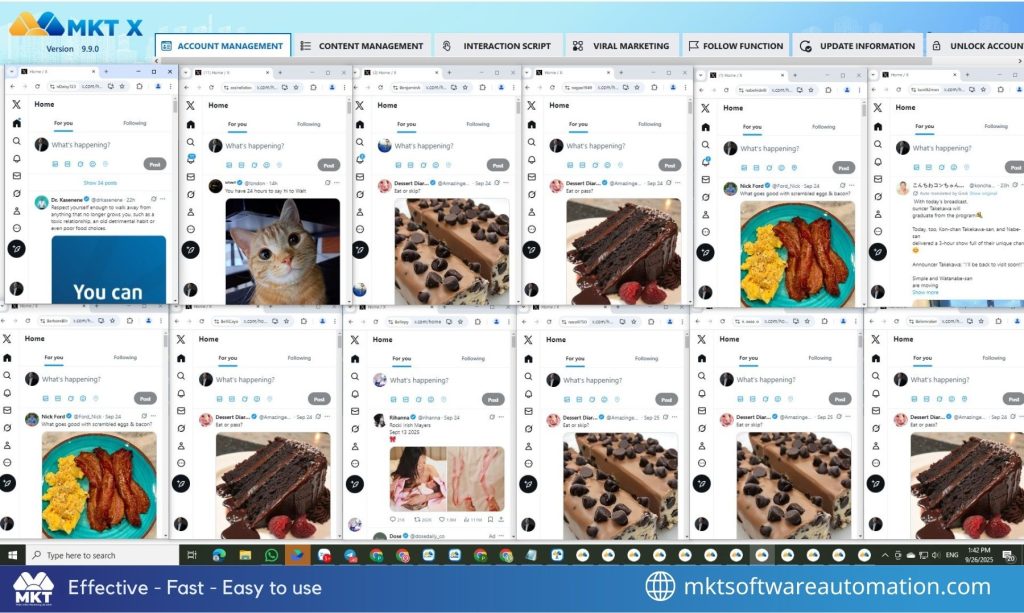
Step 4: Managing Interactions and Growth
Grow accounts organically with automation:
In the Follow section, set up automatic follows based on recommendations, keywords, or custom user lists.
Use Bulk Messaging to send personalized DMs to follower lists, following lists, or username lists.
Enable AI-powered smart commenting by integrating GPT or Gemini to generate relevant replies.
For data-driven decisions, use the data scraping feature to collect followers, likers, commenters, retweeters, and more.
These features allow you to engage audiences across multiple accounts without switching tabs or devices.
Step 5: Monitoring and Analytics
MKT X provides a powerful monitoring system:
View detailed statistics for each account, including engagement metrics, task progress, and performance reports.
Export follower and interaction data to Excel for deeper analysis.
Set up alerts for issues such as proxy failures or account checkpoints.
Regular monitoring helps you adjust strategies in real time and maximize ROI when managing multiple accounts.
4. Advanced Tips for Optimal Use
Security: Always enable content randomization and proxy rotation. Avoid aggressive automation on new accounts to prevent flags.
Bulk Editing: Quickly update profiles — avatars, bios, links, or usernames — across hundreds of accounts in minutes.
Tool Integration: MKT X supports API integration with external tools such as ChatGPT, Gemini, and CapchaMonster for automated captcha solving and smarter management.
Scalability: Run multi-threaded tasks to manage dozens of accounts simultaneously without performance degradation.
If you encounter any issues, MKT X’s free updates and dedicated support team are always ready to assist you.
5. Conclusion
Managing multiple X (Twitter) accounts is no longer an overwhelming task. With MKT X, you gain a comprehensive toolkit for automation, security, and growth — all integrated into a user-friendly, easy-to-use platform. By applying the guidance in this article, you can save time, minimize risks, and elevate your social media presence.
Contact us today to get started with MKT X and completely transform the way you build and manage your X “empire”!
* Learn more about MKT X: https://mktsoftwareautomation.com/mkt-x/